Archive for the ‘Tech-General’ Category

France launches anti-spam platform

Monday, May 14th, 2007

- I’ve often wondered why Spam is such a problem. If you polled the computer using public, I have no doubt that 80% plus would say it is a big problem and something should be done. So, it is a non-partisan issue. And yet, and yet, nothing gets done.

- And many Spam ads can be tracked back to someone. If they are selling insurance, sex pills, prostitution or real estate, there has to be a track back pathway so interested customers can find the spammer and reward them with a purchase.

- Like many things in our society, nothing gets done if there’s no profit in doing it. Or, nothing gets done if the ones doing the bad deeds have big bucks on the line and can lobby against or obfuscate the issue. I know I’m getting to be like a broken record on this issue but societies need to preserve and use their power to limit business/profit making interests when necessary for the good of the people in that society.

- So, the next time your mail box is full of Spam, ask yourself why such a huge non-partisan issue is not being dealt with here in the US.

- This article is about an effort France is mounting to try to control Spam. I wish them luck but it is such an international issue that I think they will simply succeed in driving their spammers offshore to pester them from there.

————————————–

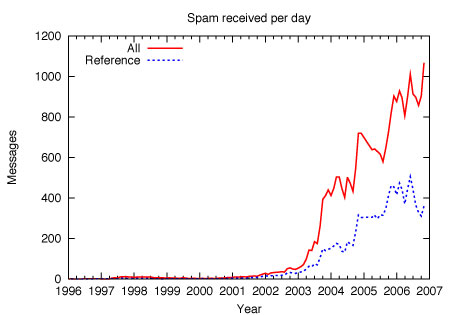
The increase in Spam over time

On Thursday, the French government launched “Signal Spam”, an anti-spam platform created in association with public entities and private companies, such as Microsoft. Internet users will be able to report spam messages by mailing them to this platform which will act as a centralised monitor of spamming activities. The platform will generate a blacklist and help initiate prosecutions against spammers.

“Signal Spam” acts as a spam repository or notification platform. There are two ways to report spam. First, the internet user can copy and paste the spam in an online form on the website of “Signal Spam”. Second, any (French-speaking) internet user can register with the platform and install a plug-in compatible with the following mail clients: Microsoft Outlook 2003 and 2007 (the user will need to install “Microsoft Visual Studio 2005” and “Redistributable Primary Interop Assemblies”) and Mozilla Thunderbird 2.0. Once installed, the plug-in allows users to notify spam to the platform by using the dedicated icon in their mail client. “Signal Spam” will then analyse the message, and if its spam status is confirmed, will then blacklist the e-mail and IP address of the sender. According to Rasle , the tool was developed by John Graham-Cunning , an internationally recognised expert who has created the open source POPFile email filtering program.

“Signal Spam” will also be able to contact users and transmit information to authorities such the French data protection authority, the Commission nationale de l’informatique et des libertés or CNIL, and the Police in order to initiate prosecutions. Data will also be shared with Internet Service Providers (ISPs) to help them in their anti-spam efforts.

More… :arrow:


use the icons below to set links to articles you like These icons link to social bookmarking sites where readers can share and discover new web pages.
  • Technorati
  • Digg
  • Reddit
  • del.icio.us
  • NewsVine
  • Slashdot
  • Spurl
  • TailRank
  • BlogMemes
  • StumbleUpon
  • Furl
  • SphereIt

070416 - Monday - How to Start a Blog

Monday, April 16th, 2007

A friend of mine recently asked for some advice on how to start a Blog and so I thought I’d write a piece on the subject.

You’ll find it here: :arrow:

This is how, by the way, this Blog is done.

Enjoy!

use the icons below to set links to articles you like These icons link to social bookmarking sites where readers can share and discover new web pages.
  • Technorati
  • Digg
  • Reddit
  • del.icio.us
  • NewsVine
  • Slashdot
  • Spurl
  • TailRank
  • BlogMemes
  • StumbleUpon
  • Furl
  • SphereIt

Where to report Spam

Wednesday, February 28th, 2007

I report some of the spam I receive - especially any connected with the banks I use. Today, I wanted to report one which originated from a yahoo E-mail address and I didn’t know where to report it to. In the course of trying to find out, I discovered a great web site which has compiled a ton of E-mail addresses to which you can report many kinds of spam. I suggest you bookmark it - it is a great resource.

http://spamlinks.net/track-report-addresses.htm

And, since we’re on the topic of Spam, isn’t it amazing that you could ask virtually anyone who spends time on the Internet if they think Spam should be outlawed and they would say ‘Yes’. And yet, and yet, we apparently have no effective laws and prosecution against it. Our national representatives find time to slip in every pork-barrel measure they can but, as a group, they cannot unite against an annoyance that 99% of their constituants would like to see banned. It really makes you wonder.

use the icons below to set links to articles you like These icons link to social bookmarking sites where readers can share and discover new web pages.
  • Technorati
  • Digg
  • Reddit
  • del.icio.us
  • NewsVine
  • Slashdot
  • Spurl
  • TailRank
  • BlogMemes
  • StumbleUpon
  • Furl
  • SphereIt

A new computer hacking attack called Pharming

Friday, February 23rd, 2007

Do you have a router in your home network? Many people do because they’ve either bought one at the store or, when they’ve gotten DSL installed, the installing company gave or sold them one. If you do, you should read the following.

I’m going to cut to the bottom line here for those who just want the beef without all the trimmings. If you have a router in your system and you haven’t changed its default from-the-factory password and you pass secret data over the Internet (things like bank account passwords), then you are taking a big risk!

Here’s why: If you visit a website wherein someone has installed malicious JavaScript code, this code will execute invisibly on your system - you won’t see a thing. And you just have to merely visit the web site - nothing else - no opening of files, no clicking of links or anything else - you just looked at it and then left. If you visit such a web site, you’ll never even know that this JavaScript code executed. And, if you visit such a site and your router’s password is still the factory default, you could be toast.

The JavaScript that invisibly executes will reach through your local network into your router (it gets into the router because it knows the password) and reprogram it so that it uses a different DNS server than the one you should be using. This kind of an attack is called Pharming.

Well, so what does that mean to you in plain English? DNS servers on the Internet are responsible for translating web site names like www.citibank.com into IP addresses like 123.456.789.123. These IP addresses are how each computer on the Internet is uniquely identified and differentiated from all of the rest. When you type in ‘www.citibank.com’, your system asks a trusted DNS server out on the Internet to translate it into an IP address and then once it has that address, it begins to chat with that computer. Getting the right number back from a trusted DNS server is critically important because it is your guarantee that you are really talking to the computer you think you are.

- What the hackers do is they change the identity of the DNS server in your router so the next time you need a web site name translated to an IP address, you unwittingly go to their DNS server system rather that the trusted one you’ve been using. Most of the time, this bogus DNS server will give you back good accurate data because it is biding its time. But, when you type in a specific web site name like www.bankofamerica.com, it recognizes it and the IP address number it returns to you is not the one for Bank of America but rather a number that takes you to their computer which is all setup to pretend to be a Bank of America computer system. Their computer will look exactly like the real Bank of America system and you will type in the passwords that give you access to your accounts and BAM, they will have them. I think you can work out what might happen next.

This kind of an attack is called Pharming and it is fairly new.

So CHANGE THE DEFAULT PASSWORD ON YOUR ROUTER and save yourself some grief. If you do on-line banking and you don’t, sooner or later you are going to chance across one of these dangerous web sites and you’ll never even know it until your bank account’s are cleared out.

Here are links to two on-line articles on this subject: :arrow: & :arrow:

And, in case you are less than computer literate, here’s a link that takes you to an explanation of what a router is :arrow: and what a DNS Server does :arrow:

Oh, and one other important point. If you do change your router’s password, change it to something that isn’t easy to guess and that you’ll remember. You may need to get into your router for something else in the future and you’ll feel pretty silly if you are blocked by your own forgotten password.   But, maybe safe and silly is better than not-silly and … broke :) .

use the icons below to set links to articles you like These icons link to social bookmarking sites where readers can share and discover new web pages.
  • Technorati
  • Digg
  • Reddit
  • del.icio.us
  • NewsVine
  • Slashdot
  • Spurl
  • TailRank
  • BlogMemes
  • StumbleUpon
  • Furl
  • SphereIt

070216 - Friday - Bad E-mail ettiquette

Friday, February 16th, 2007

<miss manners rant on>

Miss Manners

I get a lot of E-mail from friends and sometimes my correspondents will copy a whole bunch of us at once. Well, in many cases, when I see this, I cringe because they are committing a huge faux pas - which I know they are unaware of.

Consider these two E-mail headers:

To: jim@abc.com; mary@xyz.com; john@123.com
Cc: marty@yahoo.com; Ollie@hotmail.com
Bcc:
Subject: bad E-mail security

-and-

To: dennis@samadhisoft.com
Cc:
Bcc: jim@abc.com; mary@xyz.com; john@123.com; marty@yahoo.com; Ollie@hotmail.com
Subject: good E-mail security

In the first header, the sender is unwittingly sharing the E-mail address of every person he’s written to with everyone else on the list. Now, in the early days of E-mail, no one would have cared much. But now, privacy has become a real issue in all of our lives. I sometimes get E-mails with the addresses of dozens and dozens of people I don’t know this way. People whose E-mail addresses I really have no business having or knowing unless they care to share them with me.

Lucky for us, our E-mail programs have a way to allow us to send E-mails to many people at once without making all of their E-mail addresses public to all of the others. It is called the Bcc field where ‘Bcc’ means ‘Blind Carbon Copy‘. In the second header, above, I’ve sent my five E-mails to the same five people but now when they receive them, none of them will be able to see the other’s E-mail addresses. All they will know is that they received a copy of an E-mail I apparently sent to myself.

This can be useful in another way too. Consider the following E-mail header:

To: myboss@bigcorp.com
Cc: personel@bigcorp.com
Bcc: max@bigcorp.com
Subject: cubicals are evil

So, here I’ve written a letter to my boss and I’ve copied it to personel as a cover-my-ass move. But, in addition, I want to fill my friend, Max, in on what’s going on but I don’t want anyone else to know that Max is in the loop. In this case, Max will get a copy of the E-mail and no one else will be the wiser.

Now, sometimes the Bcc option is not displayed for you when you are writing an E-mail. It’s there, you just have to find out how to make it visible. In Microsoft’s Outlook E-mail program, when you are writing an E-mail and you have the new E-mail open on the screen, pull down the View Menu and you should find a menu item called ‘Bcc field’. Put a check mark in front of it to turn the Bcc field on.

<miss manners rant off>

use the icons below to set links to articles you like These icons link to social bookmarking sites where readers can share and discover new web pages.
  • Technorati
  • Digg
  • Reddit
  • del.icio.us
  • NewsVine
  • Slashdot
  • Spurl
  • TailRank
  • BlogMemes
  • StumbleUpon
  • Furl
  • SphereIt

FAIR USE NOTICE

This site contains copyrighted material the use of which has not always been specifically authorized by the copyright owner. I am making such material available in my effort to advance understanding of environmental, political, human rights, economic, democracy, scientific, and social justice issues, etc. I believe this constitutes a 'fair use' of any such copyrighted material as provided for in section 107 of the US Copyright Law. In accordance with Title 17 U.S.C. Section 107, the material on this site is distributed without profit to those who have expressed a prior interest in receiving the included information for research and educational purposes. For more information go to: http://www.law.cornell.edu/uscode/17/107.shtml . If you wish to use copyrighted material from this site for purposes of your own that go beyond 'fair use', you must obtain permission from the copyright owner.